The Platform

One causal entity graph. Four AI engines. Built for enterprise engineering teams who need answers, not dashboards.

⬡ Platform overview → ◯ Four engines → ▶ How it works → → Start free trial →

What we solve

Applicare enables teams to observe, automate, and resolve incidents faster across every stack.

★ Customer stories → → Try it free → ◯ Platform overview →
Learn
Blog
Engineering insights & deep dives
Webinars
Live sessions & on-demand recordings
White Papers
Research, architecture guides & reports
Customer Stories
Real teams, real outcomes
Product News
What’s new in Applicare
Adopt & Grow
Applicare University
Free courses for Applicare engineers
Documentation
Guides, APIs & integration docs
About Arcturus
Our mission, story & team
Partners
SI, MSP & technology partners
Community
Slack, GitHub & developer forum
Support
Helpdesk & customer portal
Downloads
Ops Vault
Datasheets, runbooks & toolkits
Featured Case Studies
AeroMexico
Digital ticketing · MTTR 4.5h → 11min
Leading Private Bank
MTTR 3.2h → 18min · first month
Mediclinic
Audit prep 11 weeks → 18 days
NTT DATA
80% on-call page reduction
Danube Group
94% SLO compliance
ONP
0 violations at last audit
Seygen
78% downtime reduction · GxP compliance
Insurance Tech Platform
67% P1 reduction · $2.4M saved
IIS & Server Availability
100% SLA report accuracy
Health Check Offering
4.2x ROI · 48hr delivery
Bank of Muscat
99.95% core banking uptime
By Industry
Financial Services
Airlines & Transport
Healthcare
Government
Retail & E-Commerce
Pharmaceuticals
Insurance Technology
Managed Services
Enterprise IT
Professional Services
HomePlatformSolutionsArcIn AIResourcesCustomers Login Book a Demo
Kubernetes Observability

See the whole cluster.
Fix the one pod that matters.

Applicare unifies pods, nodes, deployments, autoscalers, and Helm releases across every cluster into one causal view — so your teams catch failing rollouts, right-size capacity, and resolve incidents before customers ever feel them.

EKSAKSGKE OpenShiftRancherSelf-managed
Why Applicare for Kubernetes

Outcomes, not just dashboards.

Kubernetes gives you elasticity. Applicare gives you the answer to “is it healthy, is it safe to ship, and what is it costing?” — without another wall of graphs to read.

// rollout safety
Ship rollouts without holding your breath
Applicare watches every Deployment rollout and flags error-rate or latency regressions the moment new pods go live — so you roll back in seconds, not incidents.
// cost efficiency
Stop paying for pods that sit idle
Requests-vs-actual usage and bin-packing analytics expose over-provisioned workloads and half-empty nodes across the fleet, so you reclaim capacity with confidence.
// faster MTTR
Resolve cross-cluster incidents in minutes
ArcIn correlates pod crashes, node pressure, and Kubernetes Events into one root cause across clusters — the answer, not fifteen tabs of kubectl.
// elastic confidence
Scale without surprises
HPA, VPA, and cluster-autoscaler analytics show whether autoscaling is keeping up, thrashing, or throttled — before a traffic spike becomes an outage.
How it connects

From control plane to customer impact.

A single DaemonSet and a read-only watcher stream cluster state, metrics, traces, and logs into Applicare — no inbound ports, no code changes, no per-pod agents to babysit.

01 · YOUR CLUSTERS
Control plane & workloads
  • API server, etcd, scheduler, controller-manager
  • Worker nodes: kubelet & container runtime
  • Deployments, StatefulSets, DaemonSets, Jobs
02 · COLLECTION
Applicare agents
  • Node agent as a DaemonSet
  • kube-state & Events watcher (read-only RBAC)
  • OpenTelemetry auto-instrumentation
  • Prometheus / OTLP ingest
03 · PLATFORM
Causal entity graph
  • Pods → services → transactions mapped
  • Metrics, traces & logs in one store
  • Helm & rollout timeline
  • Multi-cluster fleet index
04 · ARCIN AI
Answers & action
  • Root cause across the graph
  • Adaptive anomaly baselines
  • Right-sizing recommendations
  • Alerts & runbooks to Slack / PagerDuty
🔒 One outbound TLS connection · read-only cluster access · installs via Helm or Operator in minutes
See it in action

Watch Applicare instrument a live cluster.

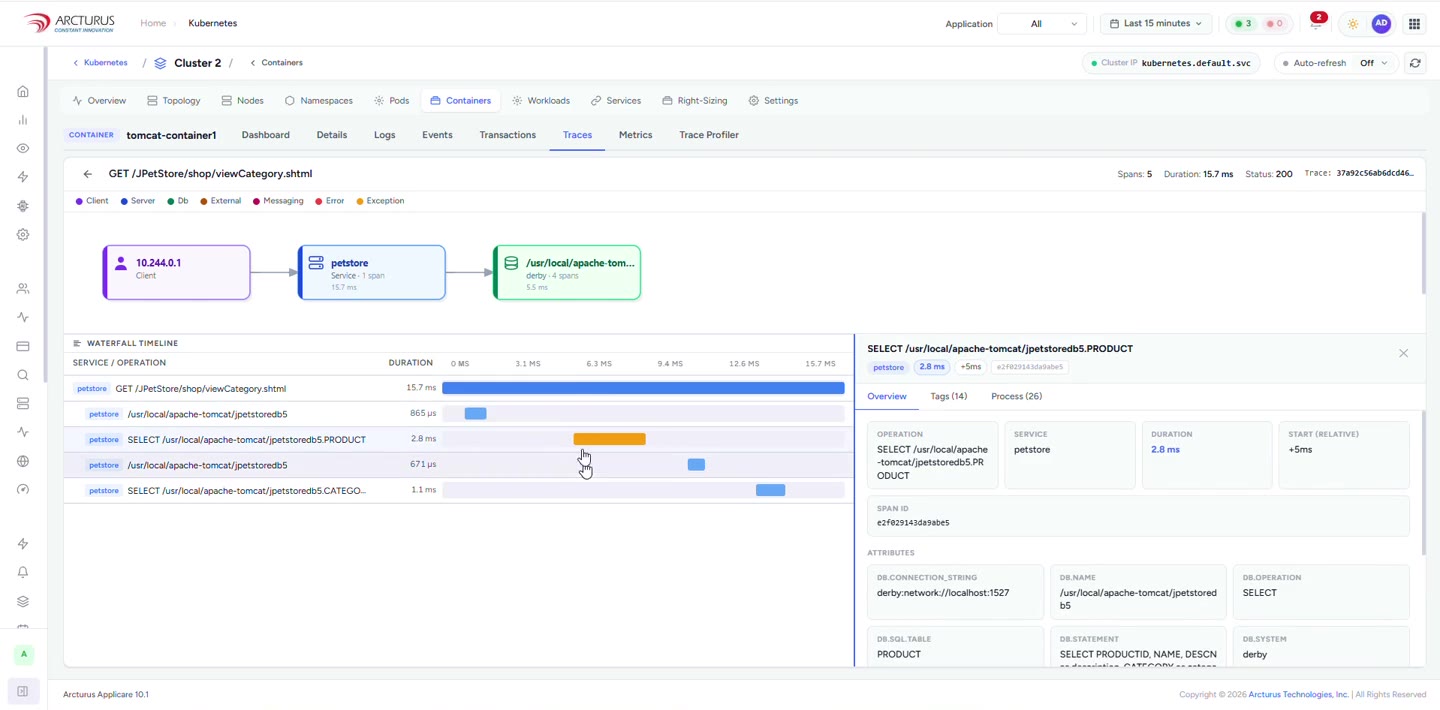
A 7-minute walkthrough: connect a running Kubernetes cluster, auto-instrument a live application with OpenTelemetry — no code changes — then read the distributed traces Applicare builds from it.

Kubernetes auto-instrumentation with OpenTelemetry — video walkthrough OpenTelemetry · live demo 7:06
Platform-specific capabilities

Built for how Kubernetes actually fails.

Not generic “infrastructure metrics.” Every capability below is tuned to the objects, controllers, and failure modes that are unique to Kubernetes.

Pods
Lifecycle & crash forensics
CrashLoopBackOff, OOMKilled, ImagePullBackOff and restart storms — with the exit code, last log lines, and the event that triggered them.
Nodes
Pressure, taints & evictions
CPU, memory, disk and PID pressure, cordon/drain activity, and exactly which pods got evicted — and where they landed.
Rollouts
Deployment tracking
Watch each new ReplicaSet go live, compare error rate and latency old-vs-new, and get an automatic rollback signal on regression.
Autoscaling
HPA / VPA / Cluster Autoscaler
Scale events, target-vs-current replicas, throttling, and whether the autoscaler is thrashing or lagging behind real demand.
StatefulSets
Stateful workloads & storage
Ordered rollout health, PersistentVolume capacity and IOPS, PVC binding failures, and per-pod stable identity.
DaemonSets
Fleet-wide coverage
Confirm node agents, CNI and log shippers run on every node — and surface the exact nodes where they don’t.
Helm
Release & drift tracking
Every install, upgrade and rollback on a timeline, values diffs, and drift between what’s declared and what’s actually running.
Multi-cluster
Single-pane fleet view
EKS, AKS, GKE, OpenShift and self-managed clusters in one index — compare health, capacity and cost side by side.
Control plane
API server & etcd health
API request latency and errors, etcd fsync/commit latency, leader elections, and slow admission webhooks.
Events
kube-state correlation
Kubernetes Events and kube-state metrics stitched into the graph, so a FailedScheduling maps straight to the service it degrades.
Network
Services, Ingress & policy
kube-proxy, Service endpoints, Ingress latency, CoreDNS failures, and connections blocked by NetworkPolicy.
Capacity
Requests, limits & bin-packing
Requested vs actual usage per workload, node bin-packing efficiency, and reclaimable capacity across the fleet.
Enterprise use cases

Real clusters. Real 3 a.m. incidents.

How platform, reliability, security and operations teams use Applicare when something is actually on fire.

DevOps
A canary rollout starts failing at 10% traffic
A new Deployment begins its rollout. Applicare compares the new ReplicaSet’s error rate and p95 latency against the stable one in real time, catches a 5xx spike isolated to the canary pods, and points to the offending build and failing endpoint — you roll back before the other 90% ever ships.
1Signal: new ReplicaSet 5xx ↑, canary only
2ArcIn: isolates canary pods + bad endpoint + commit
3Outcome: one-click rollback, blast radius contained
SRE
CrashLoopBackOff spreading across three regions
Pods start crash-looping across EKS clusters in us-east, eu-west and ap-south at once. Instead of grepping kubectl in three windows, ArcIn correlates the crashes to a single ConfigMap change rolled out by Argo CD and highlights the exact environment variable that broke container startup.
1Signal: multi-cluster crash loop, same image
2ArcIn: shared ConfigMap change is the common cause
3Outcome: revert once, all regions recover
SecurityIT Ops
Drift, privileged pods, and idle spend — before the audit
Operations needs to know what changed and what’s wasting money; Security needs to know what’s running privileged or drifting from the Helm baseline. Applicare surfaces workload posture — privileged, hostPath and hostNetwork pods, image drift — alongside requests-vs-usage and empty nodes, in one fleet report.
1Scan: every workload across the fleet
2Findings: posture + Helm drift + reclaimable capacity
3Outcome: one prioritized report for Sec & Ops
Ecosystem & integrations

Fits the stack you already run.

Applicare ingests what you have and pushes signal where your teams already work — no rip-and-replace.

Managed Kubernetes
Amazon EKSAzure AKSGoogle GKEOpenShiftRancher
Observability
PrometheusGrafanaOpenTelemetryFluent BitJaeger
GitOps & CD
Argo CDFluxHelmJenkinsGitHub Actions
Service mesh & ingress
IstioLinkerdCiliumNGINX Ingress
Incident & ChatOps
PagerDutyOpsgenieSlackTeamsJira
FAQ

Kubernetes questions, answered.

How does Applicare collect data from my clusters?
A node agent runs as a DaemonSet and a lightweight watcher reads kube-state and Kubernetes Events through a read-only ClusterRole. Applications are auto-instrumented via OpenTelemetry (no code changes), and existing Prometheus/OTLP endpoints are ingested directly. Everything leaves over a single outbound TLS connection — no inbound ports on your nodes. Install with Helm or the Applicare Operator in a few minutes.
Does it work across EKS, AKS, GKE and OpenShift at the same time?
Yes. Applicare is multi-cluster by design. Each cluster reports into a single fleet index where you can view clusters individually or compare health, capacity and cost across providers on one screen — managed and self-managed clusters together.
Will the agent add overhead to my nodes and pods?
The DaemonSet agent runs with bounded CPU and memory requests/limits and uses adaptive sampling under load, so overhead stays low and predictable. Application tracing is auto-instrumented and sampled — you get code-level visibility without modifying or rebuilding your workloads.
How is this different from running Prometheus and Grafana myself?
Prometheus and Grafana tell you what a metric is doing. Applicare ingests your Prometheus data, adds distributed traces and logs, and connects everything into a causal entity graph — then ArcIn tells you why. A dashboard shows a latency spike; Applicare shows the ConfigMap change, the pod it broke, and the customer transactions it affected.
Can it catch bad deployments automatically?
Yes. Rollout tracking compares each new ReplicaSet against the stable one in real time and emits a rollback signal when error rate or latency regresses. You can act on that signal manually, or wire it into your CD tool (Argo CD, Flux) to trigger an automatic rollback.
What RBAC and permissions does Applicare need?
A read-only ClusterRole with get, list and watch on core, apps and metrics resources. Applicare never requires write access to your cluster. Namespace-scoped installs are supported when you want to limit visibility to specific projects.

Bring every cluster into focus.

See Applicare map your pods, nodes, rollouts and Helm releases into one causal view — and watch ArcIn find the root cause of a live Kubernetes incident in under a minute.